Across any language,
stay close to the people who matter.
Your WhatsApp, LINE and other chats, translated automatically. Liao also helps you understand what they mean, remember what they care about and say what you mean in your own words. You always press Send, and memories stay on your computer.
New accounts get 50,000 free characters · Windows 10 / 11 · App in 6 languages · 简体 / 繁體 / English
Windows may show a blue warning while installing: click “More info”, then “Run anyway”.
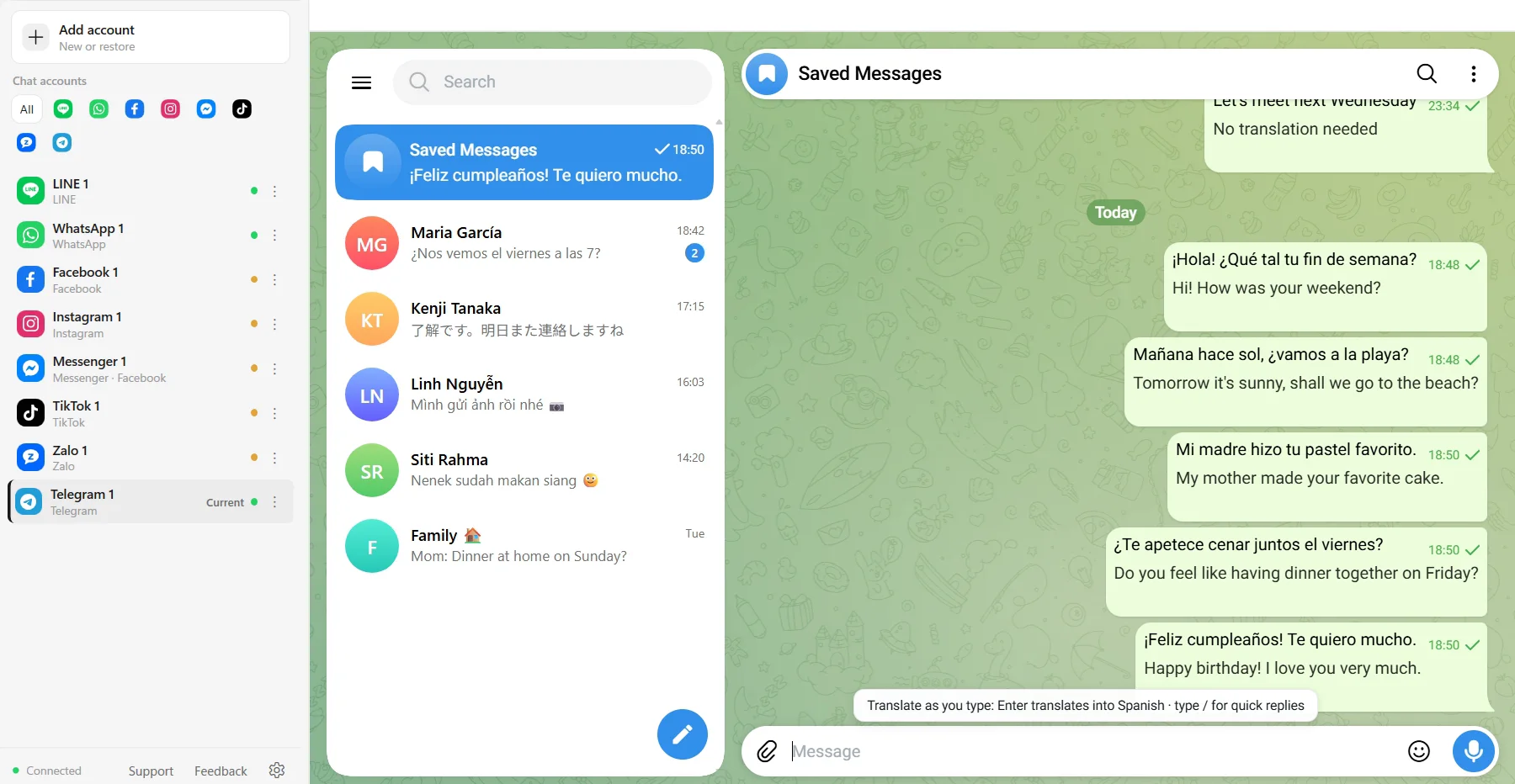
Everything a cross-language chat needs, right in the chat
No more copying between a translator and the chat. Liao puts each app’s official web version in one window and shows the translation right next to each message.
Translated as it arrives
Every incoming message gets a translation underneath. No copy and paste, no breaking the flow of the chat.
Type yours, press Enter
Write in your own language and press Enter to translate it into theirs. Edit it if you like; you still press Send.
What they really mean
When a friend says “whatever you want”, a partner says “I’m fine” or a customer says “let me think about it”, Liao adds one line on what may be behind it. Ordinary messages get nothing extra.
Translate pictures
A menu, a school notice, a payment screenshot: one click and you can read it. Text in the picture is translated, and forwarded chat screenshots are translated line by line.
A glossary for names
Add names, schools, places and product models, and they are translated your way every time. Each account can keep its own list.
Back-translation check
Before you send, see your translation turned back into your language, so you know it still says what you meant.
All your chat apps, one window
WhatsApp, LINE, Telegram, Instagram and more side by side. Switch between them without logging in again.
Separate profiles, optional proxies
Sign in to several accounts on the same app. Each keeps its own login data and cache, and each can use its own proxy.
Their local time at a glance
Liao works out where the other person is from their number and the chat, and shows their local time, so you don’t message them in the middle of the night.
An AI assistant next to the chat
Liao in the right-hand panel follows whoever you are talking to: it can see that chat, helps you work out what to say and can do the things below. It puts drafts in the input box; whether to send is up to you.
Read files
PDF, Word, Excel, PowerPoint and images: a student can make sense of a lease from the landlord, a seller can see which items in two quotes cost more.
Make pictures
Describe a picture in one sentence, then keep talking to change it: a birthday card for a friend, a product picture for a customer.
Search the web
Holidays, weather and news where they are, checked without opening a browser.
Remember each person
A friend’s exam, a partner’s birthday, the size a customer wanted: Liao remembers next time it comes up. Memories are stored only on your computer, and you can clear them in Settings at any time.
Drafts in your own style
It looks at how you usually write and drafts in your usual tone instead of translation-speak. Anything about money or promises is marked for you to decide.
Start in four steps
- 01
Download and install
Windows 10 / 11. Download, then double-click to install.
- 02
Create an account
Username, email and password. Log in later with either your username or your email.
- 03
Sign in to your chat apps
Open WhatsApp, LINE and others inside Liao and scan the QR code with your phone, as you normally would.
- 04
Start chatting
Incoming messages are translated automatically; type in your language, press Enter, then press Send yourself.
Nothing sent on its own, safer for your accounts
Liao never sends messages in a row by itself, and it has no bulk friend-adding or messaging of strangers, the usual reasons chat accounts get restricted. The AI only gives translations and suggestions; you confirm every message in the input box and press Send yourself, and it never works your accounts in the background. To send the same note to people you have chatted with, the broadcast helper translates it for each person and puts it in their input box one at a time, and you still press Send each time.
Your logins and chats stay on your computer
Login status and chat history for each app are stored only on your computer. Text to translate, and files or pictures you give Liao, go to a translation or AI service for that one request; our servers don’t keep the original text, files or pictures. To make repeat translations faster, results are cached (only the translation and a fingerprint of the original) and deleted automatically 7 days after they were last used. See theprivacy policy.
Try it free, top up when you need more
New accounts get 50,000 free characters. After that, top up from $5; credit never expires.See pricing